
Free DPC Latency Checker
 LatencyTest
A free Windows tool that finds the drivers behind audio dropouts, crackles and stutter in games. It measures how long each driver’s interrupt routines (ISRs and DPCs) run and how long real-time threads wait to run, then tells you in one sentence whether your PC is likely to have trouble, and which driver is responsible.
Free beta, for Windows 7 through Windows 11. Also included in Process Lasso, under Options > Tools.
How It Works
LatencyTest reads the kernel’s own trace events. It installs no driver, and it only measures while its window is visible: Minimizing it pauses the test, and closing it ends the trace session.
The test starts as soon as the window opens.
Play the game, run the audio work, or start the download or copy that seems to cause the problem. Leave the test running for a few minutes, since many problems come and go.
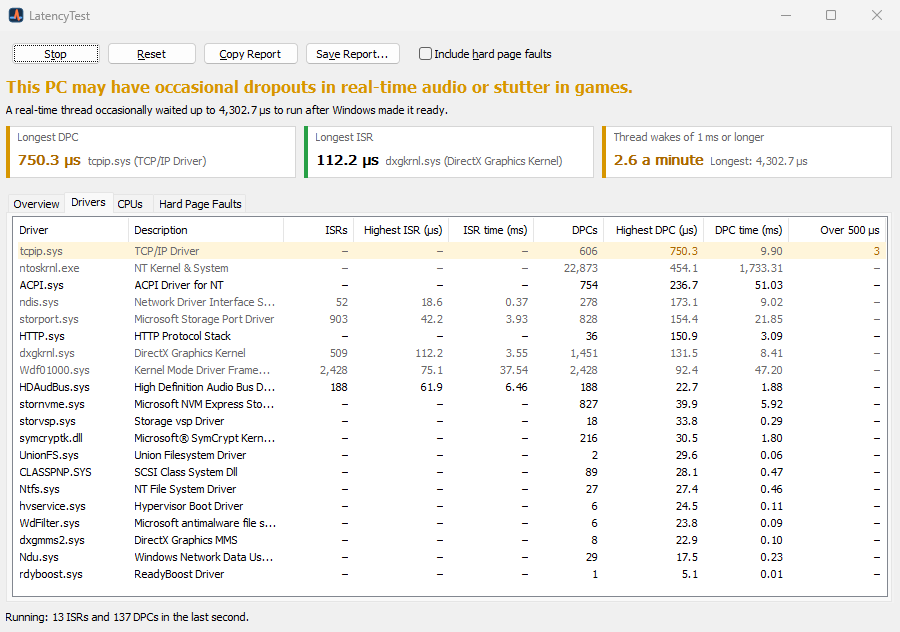
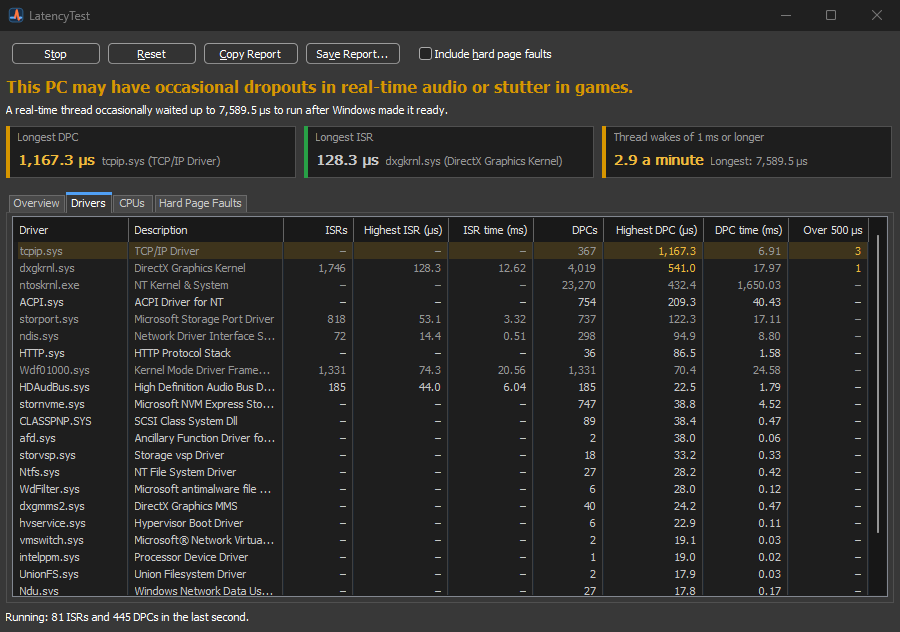
The verdict at the top says whether the PC is likely to have trouble, and the sentence under it names the driver or the measurement that decided it.
The Verdict
This PC should handle real-time audio and games without dropouts or stutter.
This PC may have occasional dropouts in real-time audio or stutter in games. An ISR or DPC ran 500 µs or longer, or real-time threads often waited 1 ms or longer.
This PC is likely to have dropouts in real-time audio and stutter in games. An ISR or DPC ran 2 ms or longer, or real-time threads often waited 3 ms or longer.
ISRs and DPCs are judged by the longest single one, because one routine that runs too long is a problem with that driver. Thread wakes are judged by how often they are slow, since an idle PC wakes a sleeping core late now and then without any audible effect.
Features
Every driver that ran interrupt routines, with counts, the longest single routine, the total time and how many ran longer than 500 µs. Times are exclusive, like Windows Performance Analyzer’s.
A high-priority thread waits on a 1 ms timer, the way an audio thread waits for its next buffer, and LatencyTest measures how long Windows takes to run it.
The same counts per logical processor, with performance and efficiency cores marked on hybrid CPUs, and a graph of the last five minutes with the Warning and Bad ranges shaded.
Right-click a driver to open Interrupt Affinity Policy with its device selected, and move its interrupts to CPUs your game or audio software does not use (on x64 and x86 PCs).
Optionally counts, per process, how often memory had to be read back from disk: A process that keeps faulting can stall even when every driver is fine.
Copy a text report to paste into a forum post or a support request, or save it as text or JSON.
On Windows 8 and later, LatencyTest uses its own private trace session, so it can run alongside LatencyMon, Windows Performance Recorder and xperf.
Follows your Windows app mode, light or dark, and speaks the language you choose when installing, or your Windows display language.
Downloads
Both are free and identical inside. Both check for a new version once a day and tell you when one is available; neither updates itself.
Adds a Start menu shortcut and an uninstaller. Uninstalling removes its files and settings.
Unzip and run LatencyTest.exe from any folder or a USB drive. Settings stay in portable.ini next to it, and nothing is written to the registry.
Need More Control?
LatencyTest is built into Process Lasso, which also keeps background processes from interfering with games and audio work, with ProBalance, CPU affinities, priorities and power plan rules.
Core parking and processor performance settings of your power plans, including the heterogeneous scheduling settings of hybrid CPUs.
For Administrators
Use /S for a silent installation. A silent install does not start LatencyTest afterwards.
The installer closes a running LatencyTest before it updates it.
Windows 7 or later and administrator rights, which reading the kernel’s trace events needs. On Windows 7, LatencyTest uses the system’s one kernel trace session, and leaves it alone if another tool is using it.