Process Watchdog
- Menu path: ‘Options / Control / Watchdog (advanced rules) …’
The process watchdog (“if, then” rules) allows for you to take an action on a process when it exceeds a certain amount of CPU or Memory. You can specify actions such as Restart, Terminate, Log, Execute (external), or Change Affinity. With both memory and CPU triggers, you can set a time the process must exceed this threshold before action is taken.
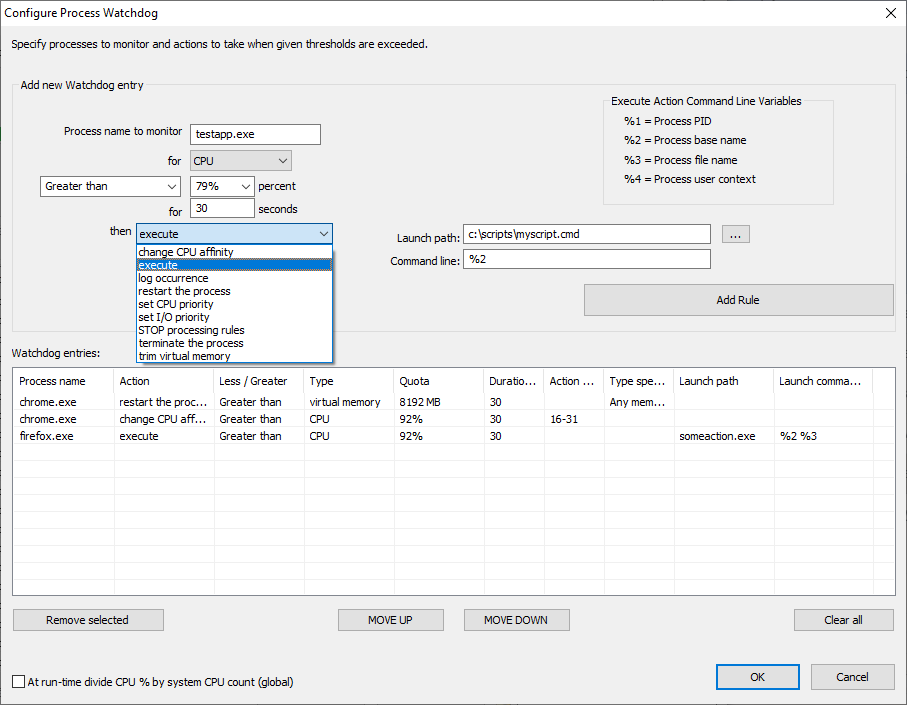
There are several actions and trigger types.
Triggers
- CPU
- Memory
Actions
- Change CPU Affinity
- Execute
- Log Occurrence
- Restart Process
- Set CPU Priority Class
- Set I/O Priority Class
- Stop Processing Rules
- Terminate Process
- Trim Virtual Memory
Options
- Divide CPU % thresholds by system CPU count
Divide CPU thresholds by the total logical core count. For example, 3200% could be given, and when divided by 64 cores, would be a threshold of 50% of total CPU use. This allows for more precision on high core count systems.
This feature supports Regular Expressions for more complex and precise matching.