Keep Running (auto-restart)
- Menu path: ‘Options / Control / Keep Running (auto-restart) …’
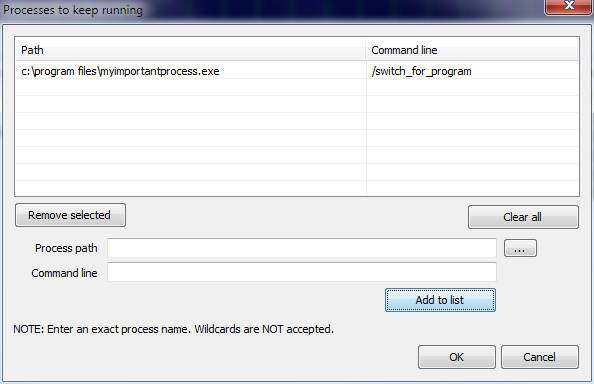
The user can ensure certain processes are kept running by entering in this dialog. This way, they can restart on crash, or restart if they become unresponsive. You can set this by right-clicking on a process, using the ‘Keep process running’, or by using application menu option at ‘Options / Control / Keep Running (auto-restart)…’.
Governor as a Process (GaaP)
Processes will be launched in the user context of the Governor. Therefore, by using the Keep Running feature, you will be prompted with the option to change the Governor startup type to that of normal process instead of service. If you want your launched processes to interact in the user session, you should do that.
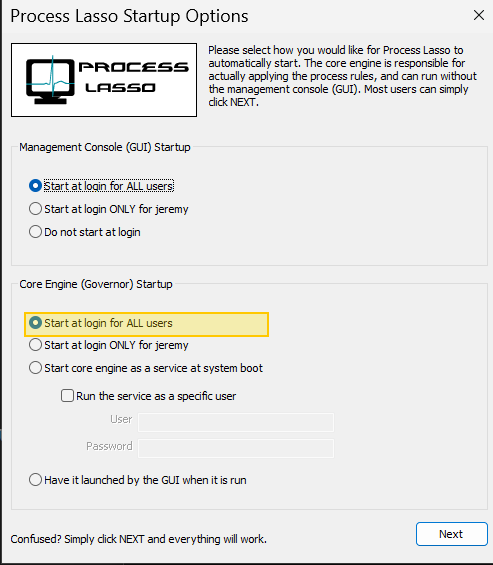
If you want to manually change the Governor startup type to GaaP, open menu item ‘Options / General / Configure Startup’ and select ‘Start at login for ALL users’ for the Governor deployment type in the bottom portion of the first dialog. If you later want to go back to a service, select ‘Start core engine as a service a system boot’.
Deploy Governor as a Normal Process
Elevation of Launched Processes
As part of security hardening, any process that Process Lasso launches runs unelevated unless you’ve previously set a registry option to launch them elevated.