Auto-Start Behavior
In menu item “Options / General / Configure Startup” users can configure how the Process Lasso GUI and, separately, its core engine (Governor service) should start. The GUI does not need to be running for rules to be enforced by the Governor. The Governor is entirely non-interactive, runs in the background, and has no visible presence. The GUI hosts the system tray icon and main Process Lasso window.
GUI
On systems with multiple limited user accounts, it is preferrable to only start the GUI for the current administrative user, or not at all. Otherwise, the GUI will ask for elevation when users log in. To adjust the startup type after install, use the aforementioned menu item. To configure it during install, use the installer command line /gui_start_type=current to set the GUI to only auto-start for the administrative user. You can also manually edit its Task Scheduler entry.
Governor
For the Governor, there are two primary choices:
- Service – Governor runs as a service (GaaS), managing all processes on the system (recommended and default option)
- Normal process – Governor runs as a normal process hosted in an administrative session, managing all processes on the system.
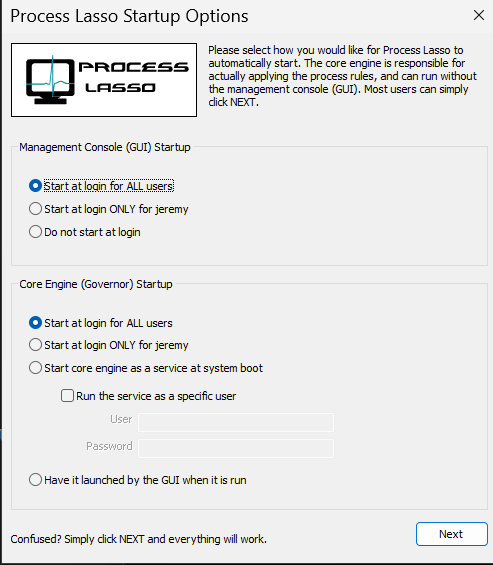
Process Lasso GUI and Governor Auto-Start Configuration