CPU Limiter
Menu path: Options / CPU / CPU Limiter
The CPU Limiter dynamically reduces the CPU use of a process by temporarily constraining its CPU affinity. When a matching process stays above a CPU threshold for a set period, cores are removed from its affinity for a set duration, capping how much CPU it can possibly consume. For example, on a 4-core system, removing 1 core caps a process at 75% total CPU.
When to use it
Use the CPU Limiter when a process's raw CPU consumption must actually be reduced, for instance:
- Remote Desktop Services (RDS) hosts, where one user's processes should not crowd out others.
- Non-critical background processes that take too large a share of the system.
Not a magic bullet
CPU utilization happens because a process is doing work; limiting it slows that work down. If your goal is a responsive system during high loads rather than lower CPU numbers, ProBalance achieves that without reducing CPU use.
How it works
You create rules specifying which processes to act on and when. Each rule defines:
- Process match, with support for wildcards, user names, and regular expressions
- Threshold: the CPU percentage that triggers the rule
- Over period: how long the process must stay above the threshold
- Restrict by: how many cores to remove from its affinity
- Act for: how long the restriction lasts; 0 means the affinity change is indefinite
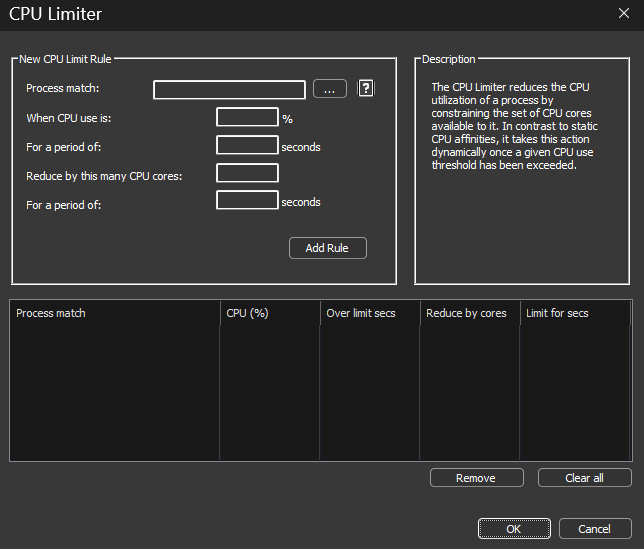
The removed cores are chosen randomly from the process's original affinity. When the act-for duration elapses, the original CPU affinity is restored. Limiter actions are recorded in the log.

Example
Suppose Chrome sometimes consumes all available CPU, but you do not want a static affinity that would also prevent legitimate short bursts. Create a rule like:
chrome.exe, after 15 seconds over 30%, restrict by 2 cores for 30 seconds
To target only a specific user's instances, append the user name to the match:
chrome.exe:johnny
Wildcards work in both process and user names:
fire*.exe:user*
If no user is specified, the rule matches any user.
CPU Limiter vs. the Watchdog
A similar effect is possible with two Watchdog rules, one to constrain the affinity over a threshold and one to restore it. The CPU Limiter is easier to configure, and unlike the Watchdog's statically defined affinities, it restores each process's own original affinity.
Demo Video
Watch the demo video (YouTube)
Related pages
- ProBalance, responsiveness without capping CPU use
- CPU Affinities, static core restriction
- Hard-Throttling
- Process Matching