|

|

|

WARNING: The Portable Edition of Process Lasso is not supported. Our installers are clean, no bundles or crud. Consider simply using Lasso in the standard form.
PURCHASE NOW
Buy one, give one free!
Why Pro?
Don't know if you need the 32-bit or 64-bit build? Download the 32-bit build. It will let you know if you need the 64-bit build, and even download it for you.
Available in 11 languages: English, German, Japanese, Serbian, Portuguese/Brazilian, Russian, Italian, Finnish, Simplified Chinese, Traditional Chinese, Indonesian, and Dutch!
WARNING: Beware of pirated copies! Don't take the risk. Know what you are getting.

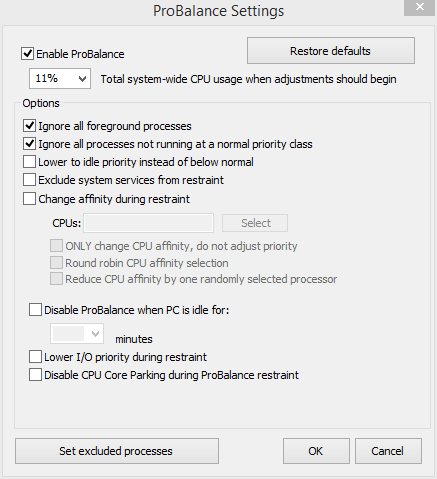
What is ProBalance? Also known as 'Process Balance', it is a way to dynamically adjust the priority of running processes so that badly behaved programs do not degrade system responsiveness. More info...

Example: Process Lasso's ProBalance improves system responsiveness (green) during a high load via process priority optimization.
The ultimate automated process priority and multi-core optimization tool!
Buy one, GIVE one free!       |
PORTABLE EDITION USAGE:
| Process Priority and CPU Affinity Optimization |
|---|
|
| Process Settings Automation |
|
| Power Profile Automation |
|
| Gaming / Multimedia |
|
| Advanced |
|
As an aside, in Windows Vista and Windows 7, adjustments of the process priority class also have an effect on the I/O and SuperFetch memory priorities for that process.
Once you install Process Lasso, it will just start working. More advanced users can tweak the configuration, but you needn't touch anything to have it instantly improve your system responsiveness and prevent stalls in high load situations.
Process Lasso is very useful and effective on even the latest high-end PCs. However, its ProBalance algorithm achieves maximum effect on PCs with relatively little CPU 'power', such as Netbooks, Tablets, and older desktops.
Process Lasso runs on all editions of Windows 2000, XP, 2003, 2008, Vista, and Windows 7.
NOTICE: This is a gimmick free web site! We only sell software that WORKS. We provide proof, but the best evidence is seeing for yourself. Use Process Lasso a while, try it out. Process Lasso consumes barely any system resources itself. It uses a stand-alone background core engine that needs as little as 1MB of RAM to run. We don't make a big splash, but do make a big difference!
Process Lasso is written in native C++, not .NET. The background core engine that manages processes is completely independent from the graphical user interface, allowing you to keep process rules applied with almost no overhead. With Process Lasso, load time is instant and resource consumption is minimal.
Portable refers to running off of USB Thumbdrives or other external media without installation to the PC.
It is strongly recommended that you use the Process Lasso Standard Edition of Process Lasso instead of this Portable Edition. Process Lasso's installer does NOT make any big system changes, but it does make sure everything is 'right'.
|
|
 |

4Sysops review of Process Lasso
IdellTech Review
BrotherSoft Review
BostonPocketPC Review
Softonic editor review of Process Lasso
Search the web to find many more ...
64-bit? 32-bit? The 64-bit build is only for those running x86-64 versions of Windows (i.e. Windows Vista x64). If you pick the wrong one the installer will inform you.